/ 10 min read
Carvikon vs Shopmonkey: pricing, features and which one fits a body shop
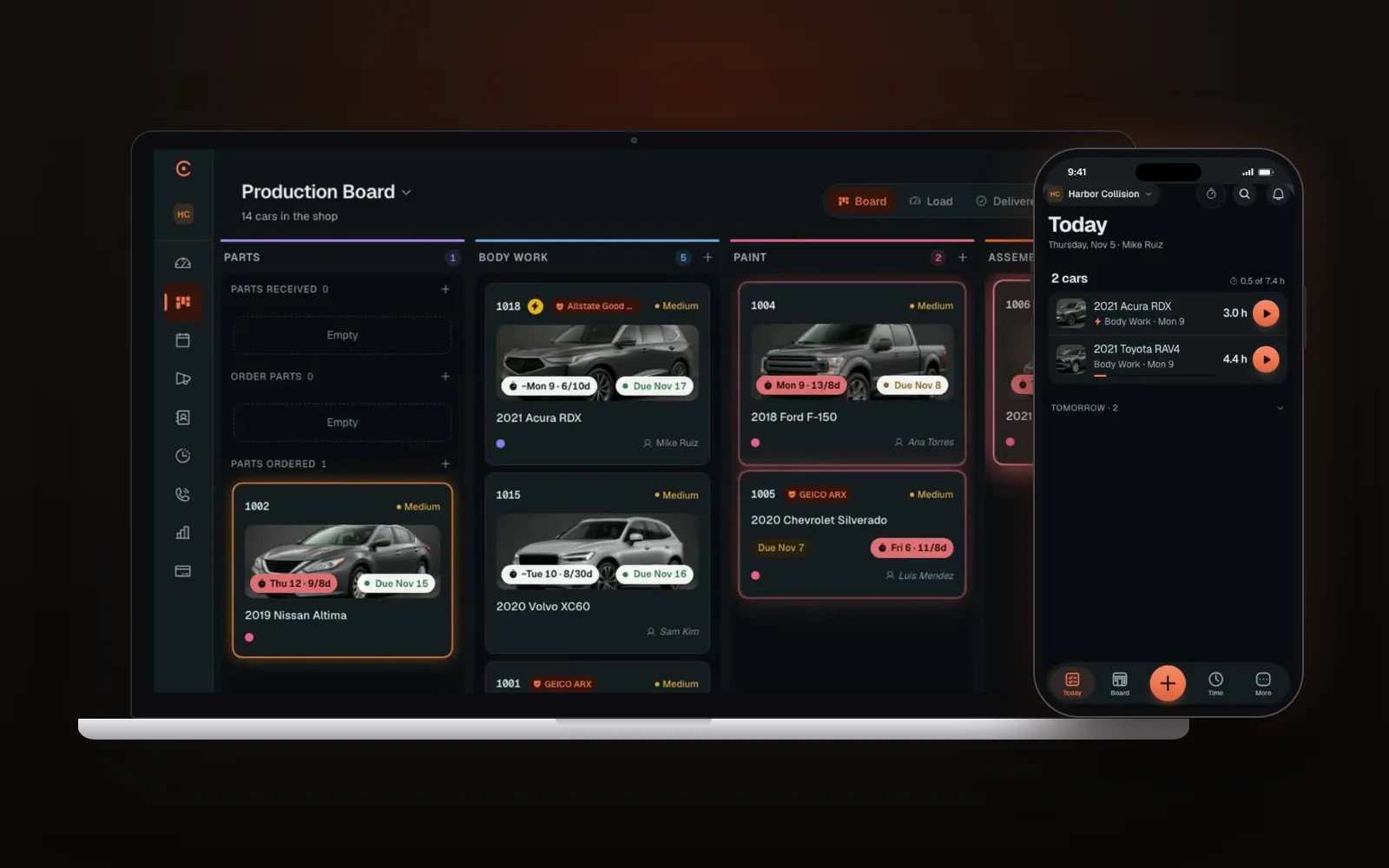
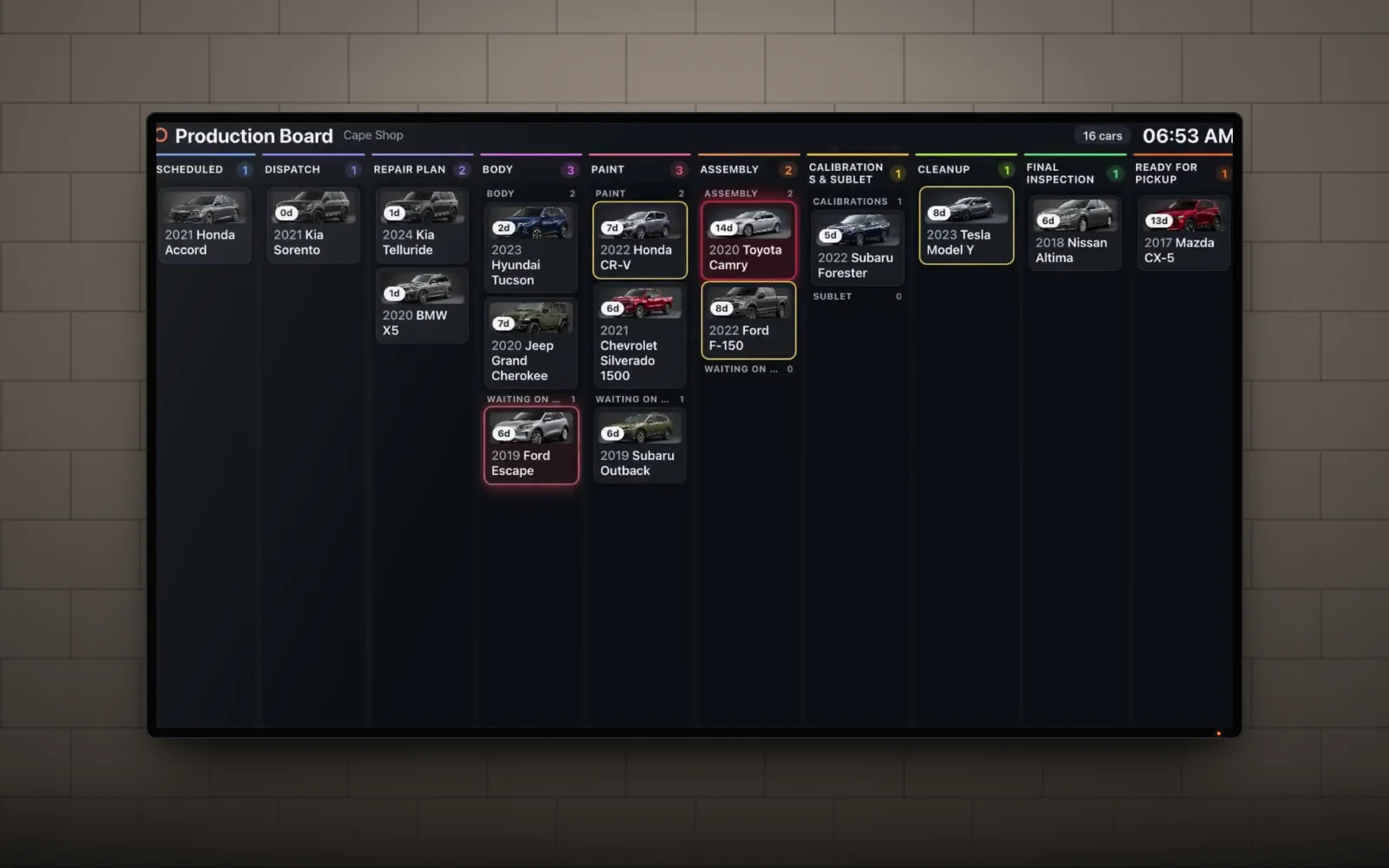
Shopmonkey and Carvikon both get called "shop software," and that's where most of the confusion starts. They start from different places. Shopmonkey is an all-in-one system built around the repair order, from estimate to invoice. Carvikon is built around the production board: one live screen that shows every car, the stage it's in, what it's waiting on and which one is running late, and the board drives everything else.
We built Carvikon, so read this with that in mind. We've tried to be straight about where Shopmonkey is the better pick. Every Shopmonkey detail below comes from Shopmonkey's own pricing page, checked November 17, 2026. Plans change, so confirm on shopmonkey.io before you decide.
The short answer
If you want one system to write repair orders, run digital inspections, look up and order parts and manage inventory, look at Shopmonkey. If your bigger problem is the floor (which car is where, what it's waiting on, who's calling to ask) look at Carvikon. Collision shops keep CCC or Mitchell for insurer estimates and run Carvikon alongside them.
Shopmonkey pricing (as of November 17, 2026)
Shopmonkey's pricing page lists three plans plus Multi-Shop, priced on request:
- Basic: $239/mo, or $215/mo billed annually. 3 user licenses.
- Clever: $399/mo, or $359/mo billed annually. 4 user licenses.
- Genius: $499/mo, or $449/mo billed annually. 5 user licenses.
- Extra users: $20/mo each, on every plan.
- Data migration: a one-time $500 fee.
- Card reader: $299, plus $10/mo per device.
Basic includes two-way text and email, unlimited estimates and invoices, a calendar with automated reminders, digital vehicle inspections (two templates), electronic signatures, integrated payments, parts lookup and ordering, and a mobile app. Clever adds the customizable shop workflow, labor guides, inventory, QuickBooks Online, a time clock and ALLDATA. Genius adds a Google reviews manager, automated estimate follow-ups and more. Shopmonkey lists 30+ built-in reports.
These figures are unchanged from our October 19 check.
Carvikon pricing
From December 1, 2026, Carvikon is $79.99 a month for Starter, $159 for Pro and $269 for Elite, per shop, and paying annually takes 20% off. Start before December 1 and you keep the price you start on for as long as you stay on that plan and billing cycle. There's no per-seat charge: Starter includes 5 users, Pro 25 and Elite unlimited. No contract, and your first payment comes with a 30-day money-back guarantee.
What each plan adds: Starter covers the board with unlimited cars, the CRM and vehicle history, estimates on the car, scheduling and online booking, photos by QR and stage-triggered customer emails. Pro adds customer texts (1,000 a month), e-signature documents, estimate PDF import, Google review requests, Instagram and Facebook posting, the time clock, card payments and reports. Elite adds the Production Plan, which assigns each stage to the tech who can finish it soonest and gives every tech a daily list on their phone, plus the AI Front Desk, Ask Carvikon on your shop's own data, Connected AI for Claude or ChatGPT, QuickBooks sync and done-for-you setup.
What a day looks like on each
On Shopmonkey, the day runs through the repair order. An advisor writes it, inspects, sends it for approval, orders parts and closes the invoice. The workflow board (Clever and up) shows where those orders stand.
On Carvikon, the day runs through the board. Here's what that looks like:
- The car comes in. Type the VIN or just "2019 Honda Accord" and it's a card on the board. If the estimate came from CCC, Mitchell or Tekmetric, drop in the PDF (Pro and Elite). Carvikon reads the lines, parts, hours and totals, you check what it read, and press Create job. It's a PDF upload, not a connection to those systems, but nobody types the estimate twice.
- The customer approves on their phone. For customer-pay work you build the estimate on the car, with Good, Better and Best options if you like. The customer approves or declines each service from a link, and declined work stays on the car for follow-up. Approved work becomes the car's labor, parts and fees, so the invoice uses the same figures.
- The tech moves the card. One tap on their phone sends the car to the next stage. The office, the owner at home and the shop TV all see it move. The TV shows year, make, model and stage, with no customer names and no prices. Techs see their cars and never your prices.
- The move does the follow-up. A stage can send the customer update, in your words, by email on every plan and by text on Pro and Elite. On Pro and Elite it can also send a document for e-signature (with reminders every 48 hours, up to three times) and a deposit request, and it asks for the Google review when the car is marked Delivered.
- The customer doesn't have to call. They get a link that follows their car stage by stage with its ready date, plus the estimate to approve, the paperwork to sign and the bill to pay. No app, no login.
- The late car shows itself. Every stage has a time limit. A car over it glows on the board and shows up in the Overview's late list, on every plan.
We wrote more about why the board matters in What is a body shop production board?
Side by side
- Built around. Carvikon: the production board. Shopmonkey: the repair order, in an all-in-one system.
- Users. Carvikon: 5, 25 or unlimited by plan, no per-seat charge. Shopmonkey: 3, 4 or 5 licenses by plan, then $20/mo per extra user.
- The board. Carvikon: every plan, on phones, computers and the shop TV. Shopmonkey: customizable workflow on Clever and up.
- Insurance estimates. Carvikon: they stay in CCC or Mitchell, and you can upload the estimate PDF (Pro and Elite). Shopmonkey: its own estimates and invoices.
- Customer-pay estimates. Both. Carvikon has Good/Better/Best options and per-service approval on the phone, on every plan.
- Customer messages. Carvikon: stage-triggered emails on every plan, texts on Pro and Elite, replies in one inbox, and drafted replies on Elite (a person still presses Send). Shopmonkey: two-way text and email on every plan.
- Inspections, parts and inventory. Shopmonkey has digital inspections, parts lookup and ordering, and inventory. Carvikon has no DVI and no parts catalog or ordering. It tracks parts on the job card, and collision boards can split parts waits by body, paint and assembly.
- Reports. Carvikon: cycle time, dwell per stage and throughput, read from card moves, on Pro and Elite. Shopmonkey: 30+ built-in reports.
- Phone. Carvikon Elite: an AI Front Desk that answers in your shop's name, tells callers where their car is, and books open times during the call if you switch booking on.
- Setup. Carvikon: nothing to install and nothing to migrate. Shopmonkey: migration help for a one-time $500 fee.
Where Shopmonkey is stronger
- One system for the whole repair order, including digital inspections, labor guides and ALLDATA from Clever.
- Parts lookup and ordering and inventory, which Carvikon doesn't do.
- A broad reporting set, with 30+ built-in reports.
- A mobile app for iOS and Android. Carvikon runs in the browser on any phone, tablet or computer.
If you're a mechanical or mixed shop that sells work off inspections and orders parts all day, Shopmonkey deserves a demo. We'd rather you buy the right tool than ours.
Where Carvikon fits better
- Your team outgrows the license count. Five people on Starter, 25 on Pro, no limit on Elite, with no per-seat bill.
- You don't want to type estimates twice. Upload the CCC, Mitchell or Tekmetric PDF on Pro or Elite and the car is on the board.
- You want the follow-up to happen without anyone remembering. Updates, signatures, deposits and review asks go out when the card moves.
- You want to see what's stuck. The late glow and target days are on every plan, and Pro adds dwell per stage. Here's how to read it.
- You want the phone answered. On Elite the AI Front Desk reads the live board, so it can tell a caller where their car is. Anything it can't answer becomes a callback for your team.
- You want it running this week. Add your stages and today's cars and put the board on the shop TV. If your crew can drag a card, they can use it.
How to decide
Ask your service writer and your painter the same question: what slowed you down last week? If the answers are about writing tickets, inspecting and ordering parts, that's what Shopmonkey is built for. If the answers are "I didn't know the car was waiting on me," "I typed that estimate twice" or "the customer called four times," that's the board's job. Keep the estimating you already pay for and upload the PDF instead of retyping it.
If you're shopping now, our body shop software checklist lists what to test during a real week, not just a demo.
FAQ
How much does Shopmonkey cost?
As of November 17, 2026, Shopmonkey's pricing page lists Basic at $239/mo, Clever at $399/mo and Genius at $499/mo, or $215, $359 and $449 a month billed annually. Multi-Shop is priced on request. Extra users are $20/mo, and data migration is a one-time $500 fee.
Is Carvikon a Shopmonkey alternative?
For shops whose main need is tracking cars through stages and keeping customers updated, yes. If you rely on Shopmonkey for inspections, parts ordering and inventory, Carvikon doesn't replace those.
Does Carvikon work with CCC ONE or Mitchell?
Carvikon runs alongside CCC and Mitchell. On Pro and Elite you can upload an estimate PDF from CCC, Mitchell or Tekmetric and Carvikon reads it into a job. That's a PDF upload, not an integration.
Can my techs use it on their phones?
Yes. Techs move cards from their own phones, add photos by scanning the car's QR code with no login, and see their own cars but never your prices.
Is there a contract?
No. Your first payment comes with a 30-day money-back guarantee, and there's no contract or cancellation fee.
See your shop on one screen
If your estimating works and your floor doesn't, see it on your own kind of shop.
Rather see it first? Book a live demo