Auto shop software for phone, tablet and TV
The board in the bay, at the desk and on the wall.
A board that only works at the front desk gets ignored in the bay. Carvikon is built for wherever the work is happening: a phone in a tech's hand, a tablet at the counter, a computer in the office and a TV on the wall that everyone can glance at.
30-day money-back guarantee. No contract.
Rather see it first? Book a live demo
Use Carvikon anywhere
Anywhere
Phone, tablet, the TV on the shop wall.
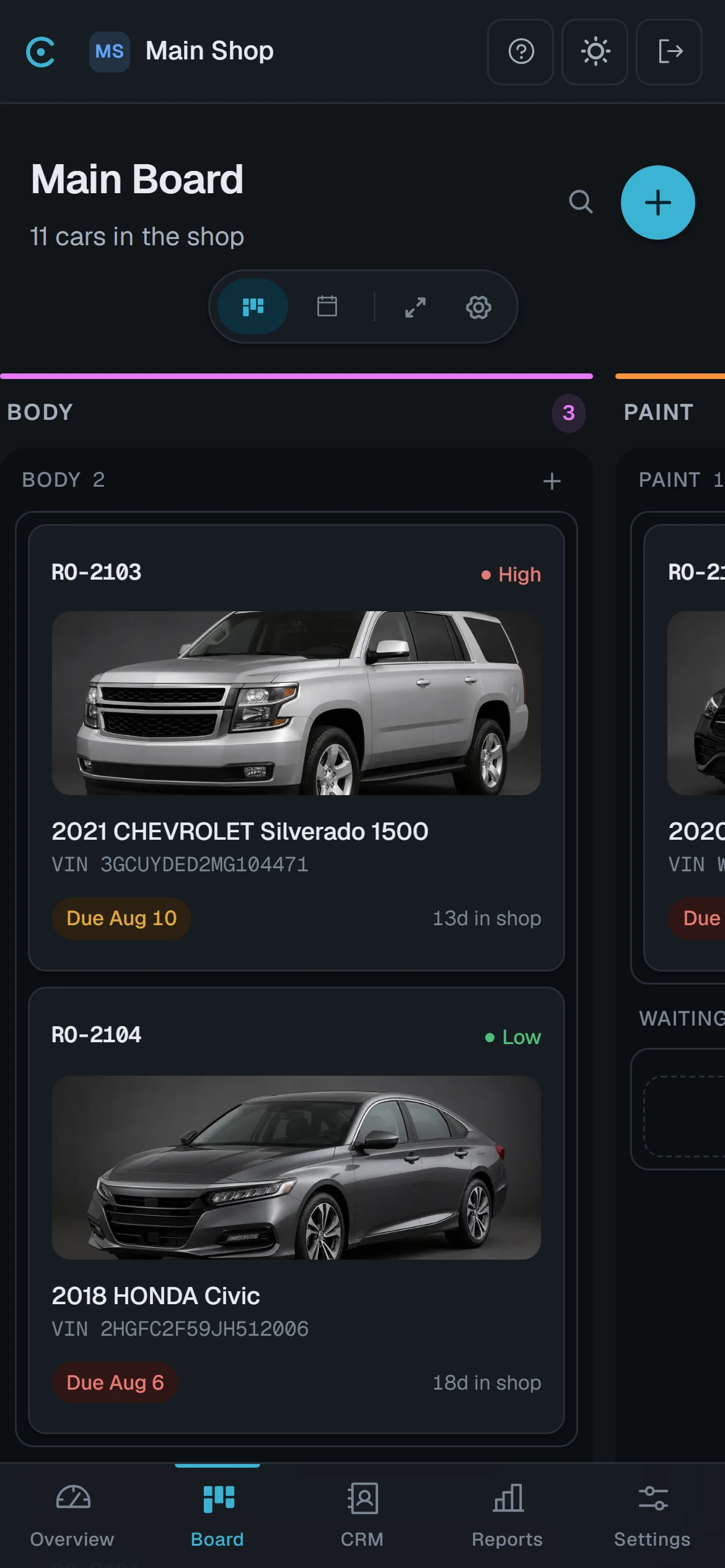
Built for the phone first, not shrunk to fit it.
A phone does not get the desktop screen squeezed small. It gets its own layout, built like an app, with a tab bar along the bottom, a Create button for what you add most and sheets that slide up over the screen. Tablets and computers get the layout built for their width. Open Carvikon in a current Chrome, Edge, Safari or Firefox, sign in, and add it to the home screen: it opens full screen, like any other app. For the shop wall, open the board, choose Show on TV, and pair a TV with the code it shows. There is nothing to install, and nothing to update on the shop computers.
One tap moves a car
Tap the arrow on a car to send it to the next stage, or swipe it to pick any other. The change is saved as soon as the card lands.
Tabs for the job each person does
Owners, managers and office staff get Home, Board, Schedule and More. A technician gets the board and their own hours, with More for the rest.
The shop TV shows the same board
Pair a TV with a code and the board updates on its own whenever anyone moves a car. It shows each vehicle's year, make, model and stage, with no customer names or prices, and nobody signs in on the TV.
Questions shops ask about Carvikon on phones, tablets and TVs.
No. They open Carvikon in the phone's browser and sign in. Add it to the home screen and it opens full screen like an app, and there is nothing to download or update.
Yes. A phone gets a layout of its own, built like an app, with a tab bar along the bottom and a Create button for what you add most. Tap the arrow on a car to send it to the next stage.
Yes. Tablets and computers get the layout built for their width, in a current Chrome, Edge, Safari or Firefox.
Open the board, choose Show on TV, and pair the TV with the code it shows. It updates by itself whenever anyone moves a car, and it shows each vehicle's year, make, model and stage without customer names or prices.
The board and their own hours, with More for the rest of their account. Owners, managers and office staff get Home, Board, Schedule and More.
The board on a phone, a tablet, a computer and a shop TV comes with every plan.