/ 11 min read
Best production board software for body shops: an honest shortlist
If you're shopping for production board software for a body shop, the honest first answer is: check what you already pay for. CCC ONE and Mitchell both have production tools. Some shops find those are enough. Others add a dedicated board because they want something techs can update in a second, that runs on the shop TV, and that measures how long cars sit in each stage.
We build Carvikon, which is one of the options below, so read this with that in mind. This list is unranked. Every competitor detail comes from that vendor's own website or help docs, checked October 19, 2026, and we re-checked the published prices on November 17, 2026. Prices change, so confirm before you buy.
What a production board actually has to do
A production board earns its spot on the wall if it does four things:
- It stays current without nagging. If updating it is slower than the whiteboard, it'll be wrong by Thursday.
- It shows what's stuck. Days in stage, or days against a target, at a glance.
- It measures cycle time by stage. "Paint is slow" is a feeling. Knowing how many days cars sit in Paint is something you can fix.
- It reaches everyone. Techs' phones, the shop TV, and the customer who wants to know where their car is.
The fifth question is whether it works next to your estimating system or replaces it. We covered why that matters in Estimating and tracking are two different jobs. And if you're still on a whiteboard, start with What is a body shop production board?
The options at a glance
- CCC ONE production tools. Built into CCC's repair facility platform. Pricing isn't published.
- Mitchell RepairCenter and Mitchell Cloud Repair. A collision management suite where production is a module. Pricing isn't published.
- Audatex AutoFocus. Collision shop management from Audatex. No pricing on the page we checked.
- Body Shop GM. A management layer on top of CCC ONE, Mitchell and Audatex. Core $399, Growth $598 and Pro $847 per shop per month (as of November 17, 2026).
- BodyShopOS. A production, labor and payroll-prep layer alongside CCC ONE. Check bodyshopos.com for current plans.
- Carvikon. A production board that runs alongside CCC and Mitchell, with estimate PDF upload on Pro and Elite. From December 1, 2026: Starter $79.99, Pro $159 and Elite $269 a month, 20% off paid annually.
- The all-in-ones: Shopmonkey, Tekmetric, AutoLeap. Full shop management systems with a board inside. They replace your shop system rather than sitting next to it. As of November 17, 2026, their published plans start at $239/mo (Shopmonkey), $199/mo (Tekmetric) and $199/mo plus a setup fee (AutoLeap).
The options, one by one
CCC ONE production tools
CCC's help docs describe Production Boards on cccone.com that sync with the desktop app. Columns map to repair phases, you drag cards to update the repair plan, and multi-shop operators can share company boards. A Production Schedule dashboard adds a weekly schedule, a Floor Plan view, color status and WIP metrics against targets.
Best for: shops deep in CCC ONE that want production in the same place as the workfile. Keep in mind: pricing isn't public, and what you can use depends on your CCC package.
Mitchell RepairCenter and Cloud Repair
RepairCenter's Production Management module tracks progress per vehicle by department and shares production schedules. Vehicle location and key dates on mobile need the Attachments & Mobile module. Its scheduler plans by shop capacity and parts lead time. Mitchell Cloud Repair includes RO management, production management, accounting and parts ordering.
Best for: Mitchell shops that want production, scheduling and accounting in one suite. Keep in mind: it's modular and pricing isn't public.
Audatex AutoFocus
AutoFocus offers visual production and cycle time management with a color-coded capacity schedule. AutoWatch adds SMS and email status updates and a customer portal.
Best for: shops that want a full collision management system with customer status updates. Keep in mind: there's no pricing on the page we checked.
Body Shop GM
Body Shop GM positions itself as a layer on top of CCC ONE, Mitchell and Audatex. Its Floor module, included in Core, has stage targets (with DRP overrides), photo gates, firm dates, a TV mode and CCC ONE status sync. It sells through demo bookings.
Best for: shops that want enforced stage gates and are comfortable at that price. Keep in mind: $399 to $847 per shop per month (as of November 17, 2026).
BodyShopOS
BodyShopOS describes itself as "the production, labor, and payroll-preparation layer" for collision shops, "alongside CCC ONE, not a replacement for estimating."
Best for: shops whose biggest headache is labor and payroll prep. Keep in mind: we couldn't confirm its current plans and prices from a live page, so check its site.
Carvikon
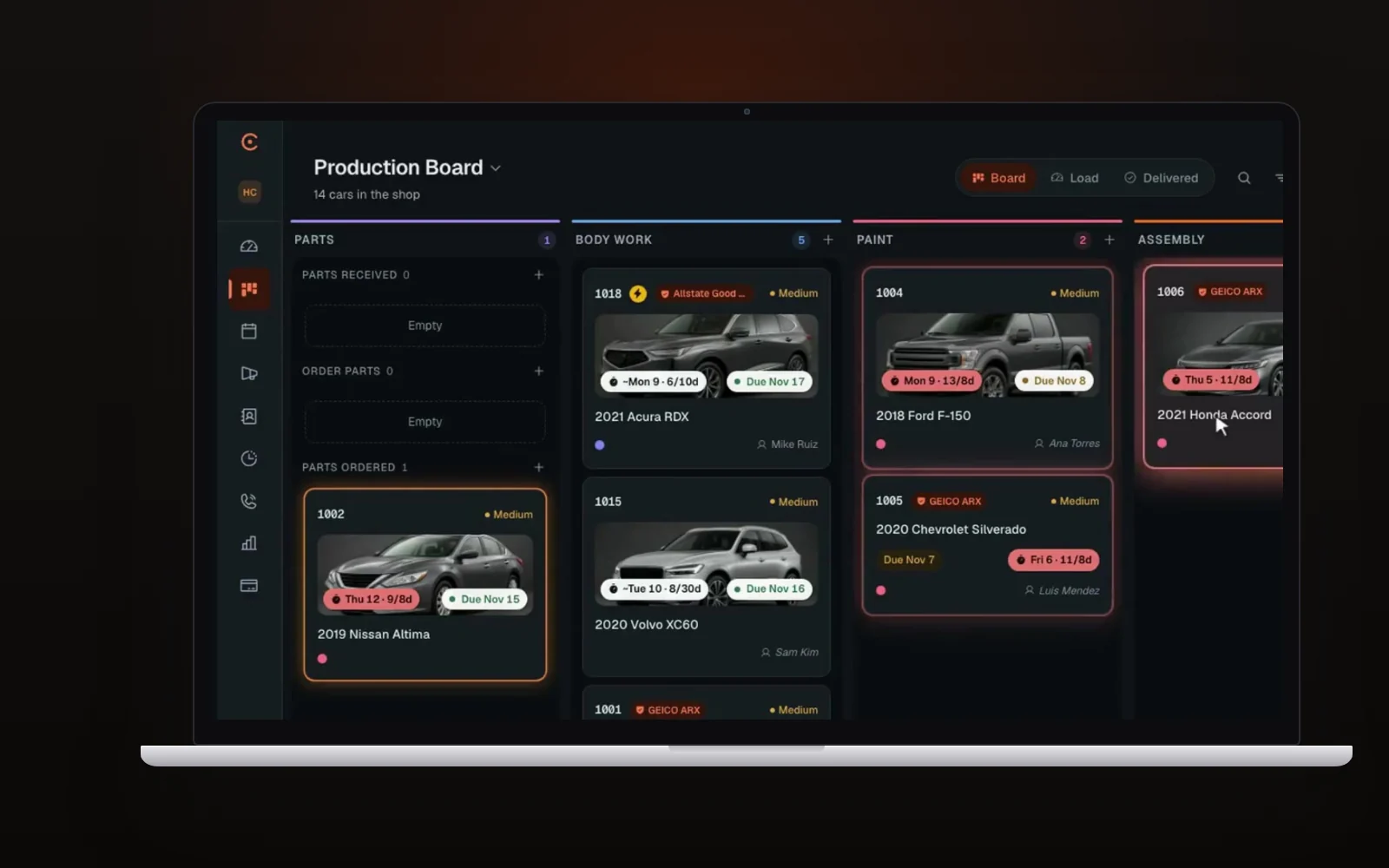
Carvikon is our board, built to run alongside CCC and Mitchell. It isn't an insurance estimating system. Here's how it does against the four tests above.
- Stays current. The tech taps the arrow on their phone and the car moves to the next stage. The office, the owner at home and the shop TV see it right away. Photos go on the job by scanning the car's QR code, on any phone, with no login.
- Shows what's stuck. Every stage has a time limit. A car over it glows on the board, shows up in the Overview's late list and sends a notification, on every plan. Lanes under a stage show why a car is waiting, and collision boards split parts waits by body, paint and assembly, so you can see which wave of parts is late.
- Cycle time by stage. On Pro and Elite, reports read cycle time, dwell per stage and throughput straight from card moves, with no timesheets. The stage with the biggest dwell is your bottleneck.
- Reaches everyone. Pair the shop TV with a code and nobody signs in on it. It shows year, make, model and stage, with no customer names and no prices. Techs see their own cars and never your prices. Customers get a link that follows their car stage by stage with its ready date, and a stage can send the update for you: email on every plan, text on Pro and Elite.
A few things built for collision work:
- Estimate PDF upload (Pro and Elite). Drop in the CCC or Mitchell estimate PDF. Carvikon reads the lines, parts, hours and totals, you check them, and press Create job. It's an upload, not a connection, but nobody retypes the estimate.
- Paperwork that sends itself (Pro and Elite). Direction to pay, supplement approvals, total loss releases and teardown authorizations are ready to use. Attach one to a stage and it goes out when the car lands there, then reminds the customer every 48 hours, up to three times.
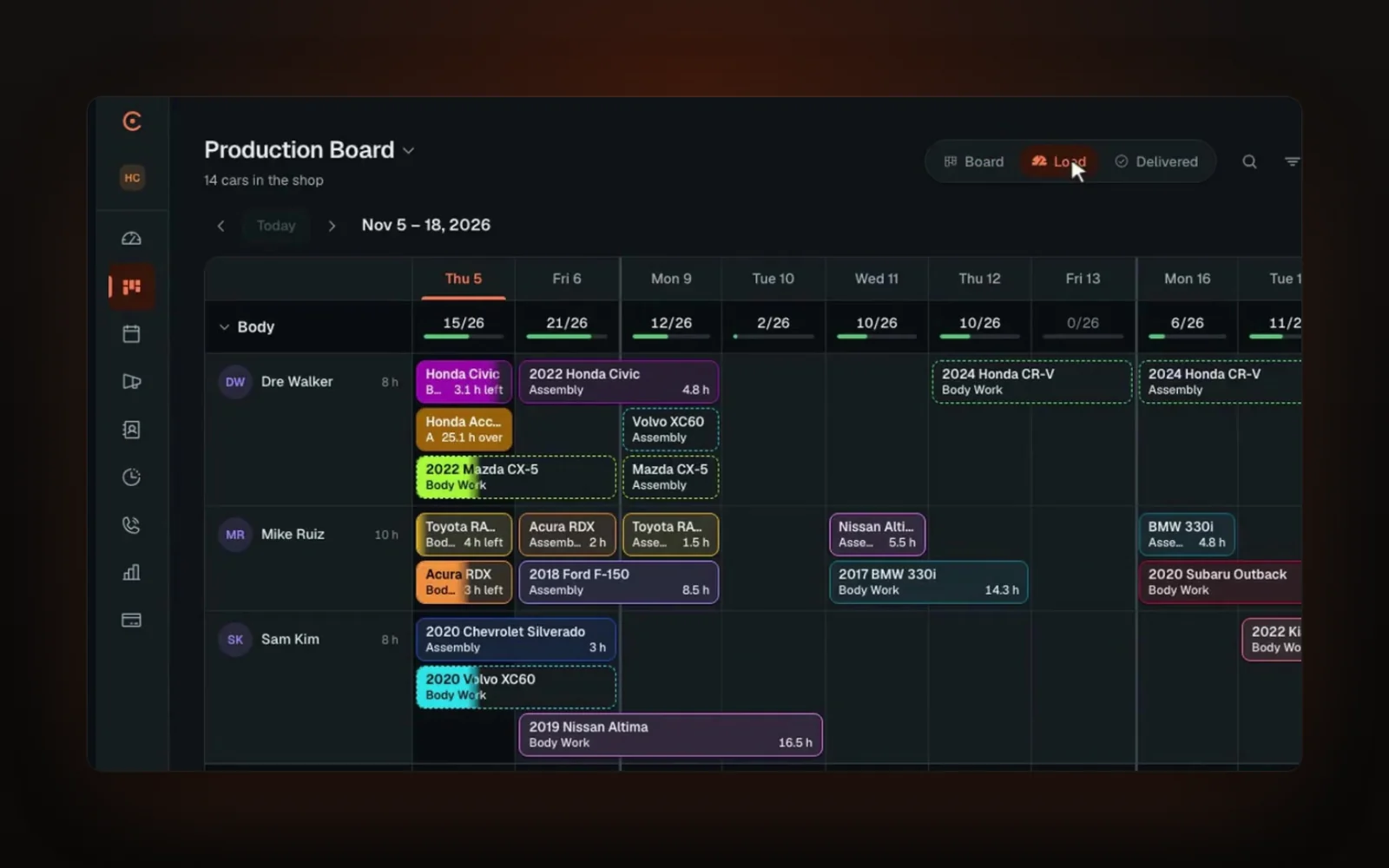
- The Production Plan (Elite). Set your own deadlines (a board target, a DRP program's days from your own agreement, or one car's date) and Carvikon plans each stage. Hours come from the estimate where it has them, and otherwise from how long that stage usually takes at your shop. Each stage goes to the tech who can finish soonest. Every tech gets a daily list on their phone, the Load tab shows the next two weeks by department, and a car's clock starts when it arrives. If a tech calls out, mark them off and the cars move to whoever fits, and you see the result before you confirm. It's for any shop that sets its own deadlines, and it handles DRP targets too.
Pricing: From December 1, 2026, Carvikon is $79.99 a month for Starter, $159 for Pro and $269 for Elite, per shop, and paying annually takes 20% off. Start before December 1 and you keep the price you start on for as long as you stay on that plan and billing cycle. Starter includes 5 users, Pro 25 and Elite unlimited, with no per-seat charge.
Best for: shops that estimate in CCC or Mitchell and want a board the crew keeps current, cycle time by stage, and customer updates that go out when the card moves. Keep in mind: there are no digital inspections, parts ordering or inventory. Reports and PDF upload start on Pro, and the Production Plan is on Elite.
The all-in-ones: Shopmonkey, Tekmetric, AutoLeap
These are full shop management systems with a board inside: Shopmonkey's Customizable Workflow (Clever and up), Tekmetric's Technician Board (Scale) and AutoLeap's Customizable Work Board (every plan). They're strong at estimates, inspections, parts and invoicing for general repair. A collision shop on CCC or Mitchell would be buying a second system to get the board. We wrote about that trap in Shop management software vs a production board.
What we left off
- Steercom: we couldn't find body shop software under that name. Steer (steer.io) is a front-of-house CRM for repair shops, not a production board.
- BodyShop Booster: a real collision product, but its site now describes AI lead capture and booking rather than production tracking.
How to choose
Start with what you already pay for. If your CCC or Mitchell package includes production tools, try them for two weeks and be honest about whether the crew keeps them current. If you need enforced gates, look at Body Shop GM. If labor and payroll prep are the pain, look at BodyShopOS. If you want a board your techs move from their phones, a TV with no names or prices on it, customer updates that send themselves and cycle time by stage, while you keep CCC or Mitchell for estimates, look at Carvikon. If you're replacing your whole system, compare the all-in-ones.
Whatever you test, test it on a real week. Our body shop software checklist lists what to try.
FAQ
What is a body shop production board?
One screen that shows every car in the shop and the stage it's in, from intake through body, paint and delivery. Anyone can look at it and know where a job stands without walking the floor.
Does CCC ONE have a production board?
Yes. CCC's help docs describe Production Boards on cccone.com that sync with the desktop app, plus a Production Schedule dashboard with a Floor Plan view. What you can use depends on your CCC subscription.
Do I need a separate board if I use CCC or Mitchell?
Not always. Some shops find the built-in tools are enough. Others add a board because they want faster updates from techs, a TV display, automatic customer updates or cycle time by stage.
How do I measure cycle time by stage?
Record when each car enters and leaves every stage, then average the days per stage over a period, like the last 30 days. A board that timestamps every move does it for you. Here's how to read the result.
Does Carvikon read my CCC or Mitchell estimates?
On Pro and Elite you can upload the estimate PDF from CCC or Mitchell and Carvikon reads it into a job. That's a PDF upload, not an integration.
Is there a contract with Carvikon?
No. Carvikon comes with a 30-day money-back guarantee on your first payment, no contract.
See your shop on one screen
Want to try a board on your own cars?
Rather see it first? Book a live demo