/ 8 min read
Auto repair shop marketing: fix the follow-up before you buy more ads
Carvikon field notes / auto repair shop marketing
Most advice on auto repair shop marketing starts with ads, SEO and mailers. Those have their place. But a lot of what brings a customer back, or sends their neighbor to you, happens while the car is still in your shop: whether someone answered the phone, whether the customer knew where their car was, and whether anyone asked for a review after pickup.
That part of marketing doesn't need a bigger budget. It needs follow-up that happens every time. Here are six habits that do that, and how a production board can run most of them.
Where auto repair shop marketing leaks
Before spending more to bring people in, look at where they slip out. In most shops it's the same few places:
- The phone rings during a busy hour and goes to voicemail. The caller tries the next shop on the list.
- The customer calls to ask if the car is ready, gets put on hold, and remembers that more than the repair.
- Nobody asks for a review, or someone asks a week later, at random, when the customer has moved on.
- The best before-and-after photos stay on a tech's phone and never get posted.
- Declined work gets forgotten. The customer said "not today" to the brakes, and nobody brings it up again.
- Booking only works by phone, during business hours, so the person searching at 9 PM books somewhere else.
None of these are ad problems. They're follow-up problems, and software handles follow-up well when it's tied to something that happens anyway.
Watch the full Carvikon demo (about 8 minutes): Carvikon Elite: your whole shop on one screen. It shows the board, customer updates and the tracking link, the review request after delivery, AI-planned social posts and a real AI Front Desk call.
1. Answer the calls you're missing
A missed call is a lost customer you already paid to attract. In Carvikon, the AI Front Desk (Elite) answers the shop phone in your shop's name, either all the time or only the calls your crew misses. Most shops use it for after hours plus overflow.
It reads the live board, so when a customer asks where their car is, it can tell them. If you switch booking on (it's off by default), it offers truly open times and books the appointment while the caller is still on the line. Anything it can't handle becomes a callback task for your team, and it never guesses. It can also call back missed calls and make "your car is ready" calls, within quiet hours, a daily cap and opt-outs. There is no cold-calling or marketing mode, and it speaks English only.
Every call lands on the Calls screen with a transcript and summary.
2. Let people book when they're ready
Plenty of customers look for a shop at night. Every Carvikon plan includes a booking page under your shop's name that offers only open times: closed days are greyed out, full days say "Full", and two people can never take the same slot.
Share the link, print the QR code for the counter, or put the form on your own website with one line of code, styled with your logo and colors. A booking lands in the Scheduled column on the board with the customer, the vehicle and their note. The customer is added to your CRM, or matched to their existing record. More on this in auto repair scheduling software.
3. Keep the customer in the loop without picking up the phone
The repair itself is the biggest marketing moment you have. A customer who never had to chase you is a customer who tells people about you.
In Carvikon every car is a card and every stage is a column. Attach a message to a stage, and when the card lands there, the update goes out in your own words. Email works on every plan. Texting is on Pro and Elite, once your number has carrier approval and the customer has opted in. Each customer also gets a link that follows their car stage by stage with its ready date, plus the estimate to approve and the bill to pay, with no app and no login.
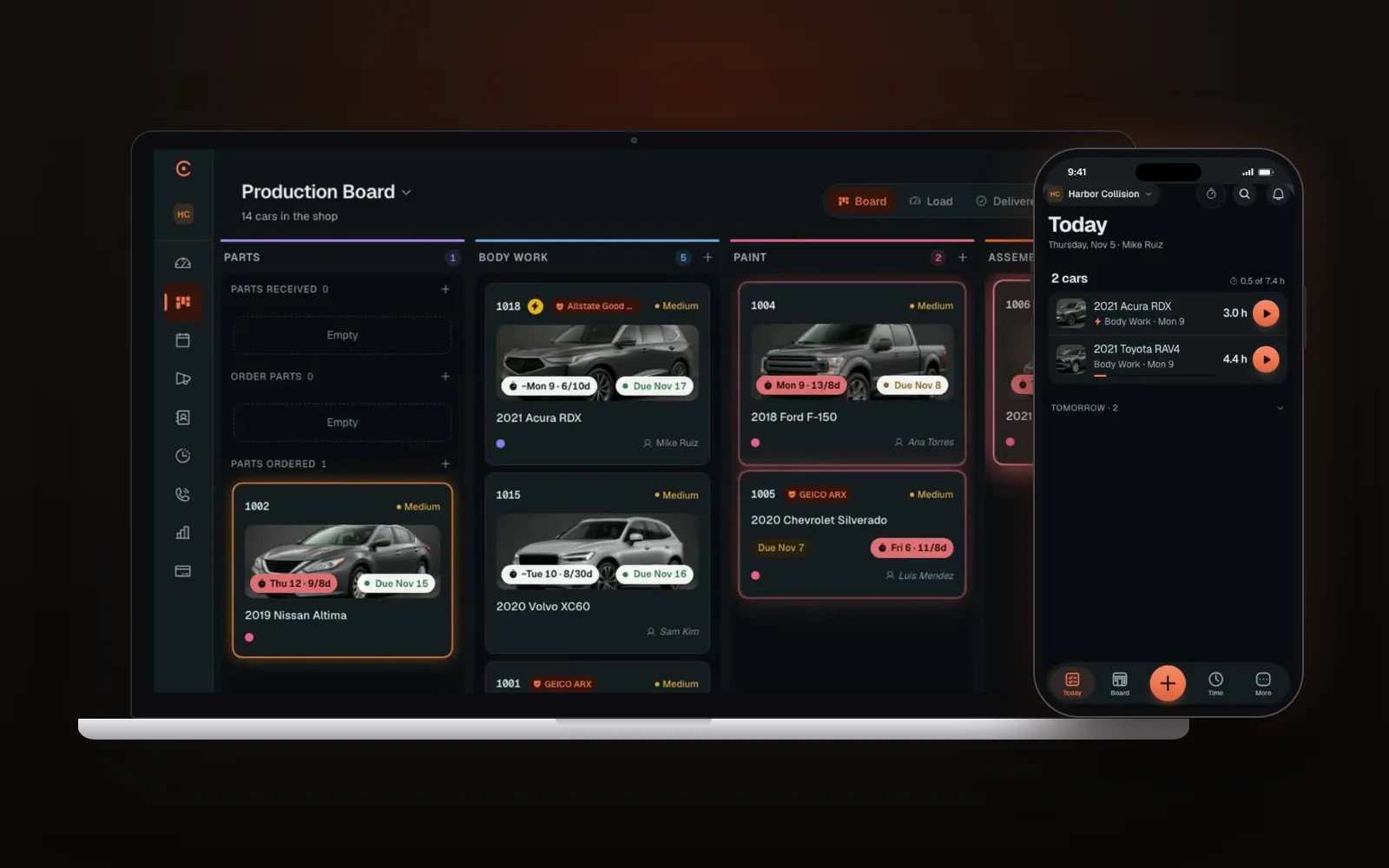
The tech moves the card from their phone when a stage is done. The update goes out, the board on the shop TV moves (the TV shows no customer names or prices), and nobody at the counter has to make a call. If "is it ready?" calls eat your mornings, read why customers call, and how to stop it.
See your shop on one screen. Book a demo and we'll show the updates, the tracking link and the review request running off a live board.
4. Ask for the review at the right moment
The best time to ask for a Google review is soon after the customer drives away happy. The worst time is never.
On Pro and Elite, Carvikon sends the review request when a car is marked Delivered, after the delay you choose, from right away up to a week later (next day is the default). It goes by text or email, in your own template, with each location's own review link. It respects consent and quiet hours. Nobody has to keep a list or remember who got asked.
5. Post the work you already do
Social media doesn't need a content team. You already make the content: the dented quarter panel on Monday and the finished car on Friday.
Every car in Carvikon has a QR code. Anyone on the crew scans it, the phone's camera opens with no login, and the photos file on the job. On Pro and Elite there's a posting calendar beside the board. One Facebook sign-in connects your Pages and the Instagram accounts linked to them, and "From a job" pulls the after-photos straight from the car. You can post photos, carousels, Reels and Stories, and drag a post to reschedule it. On Elite, AI can plan a week of posts for you, and nothing publishes until you approve it.
6. Follow up on the work they said no to
Declined work is the warmest lead in your shop. The customer already trusts you with their car, and you already know what it needs.
In Carvikon you build the estimate on the car, service by service, and can offer Good, Better and Best options. The customer approves or declines each service on their phone, or leaves one to decide later. Declined work stays on the car for follow-up, and the customer's record in the CRM keeps their vehicles, history and tags. When they come back for an oil change, the brakes they skipped are right there. There's more on the approval side in mechanic shop software: the approval queue is the real bottleneck.
What software won't do for you
A board won't run your Google Ads or fix a bad reputation, and no Carvikon plan manages your ads. What it does is make sure the follow-up after the phone rings happens every time: the call gets answered, the customer hears from you, the review gets asked for, and the photos get posted.
Before you spend more on ads, check those leaks. More traffic into a leaky shop just means more missed calls.
What it costs
Online booking, the booking page and email updates come with every plan. Texting, Google review requests and social posting are on Pro and Elite. The AI Front Desk and AI-planned posts are on Elite.
From December 1, Starter is $79.99 a month, Pro is $159 and Elite is $269, per shop, and annual billing takes 20% off. Start before December 1 and keep your price for as long as you stay on that plan and billing cycle. Starter includes 5 users, Pro 25 and Elite unlimited, with no per-seat charge. Your first payment comes with a 30-day money-back guarantee, and there's no contract.
FAQ
What is the best marketing for an auto repair shop?
There's no single answer, but start with the customers you already have. Answer every call, keep customers updated during the repair, ask for reviews after pickup and follow up on declined work. Then spend on ads and SEO.
How do I get more Google reviews for my shop?
Ask every customer, at the same point, every time. The day after pickup works well. In Carvikon, Pro and Elite send the request automatically when a car is marked Delivered, with your own review link.
Should my shop text customers?
Texts work well for quick updates, but customers have to opt in, and your number needs carrier approval first. Carvikon's booking form has a consent box that's never pre-ticked, and STOP is honored and shown on the customer's card.
Can the AI Front Desk make marketing calls?
No. It answers calls, books appointments if you switch that on, and makes callbacks, reminders and "car ready" calls. There's no cold-calling or marketing mode.
Does Carvikon run ads for my shop?
No. Ad management isn't part of any Carvikon plan. The plans cover the board and the follow-up around it: customer updates, booking, reviews, social posting and the AI Front Desk.
Does it work for body shops too?
Yes. Collision shops keep CCC ONE, Mitchell or Audatex for insurer estimates and run Carvikon alongside them. On Pro and Elite you can upload the estimate PDF and Carvikon reads it onto the car. That's an upload, not an integration, and a direct CCC integration is planned for after New Year.
See your shop on one screen
Most marketing leaks are follow-up leaks. See what it looks like when the board does the follow-up for you. Book a demo and we'll walk through your kind of shop on a live board.
Rather see it first? Book a live demo