/ 10 min read
Auto repair scheduling software: the calendar is the easy part
When people shop for auto repair scheduling software, they usually mean an appointment calendar: a place for customers to book and a screen showing who's coming in tomorrow. That part matters. But in our experience it's the easy part.
A shop runs on two schedules. The first is the calendar: when the car arrives. The second is the floor: who works on it, in what order, and whether it'll be done when you said. Most shops have software for the first and a whiteboard, or one person's memory, for the second. The promised date gets missed in the gap between them.
Schedule one: the appointment calendar
A good appointment calendar does a few boring things well.
- It only offers times you can actually take. A booking form that offers Saturday at noon when you're closed makes more work than it saves.
- It respects your rules. Slot length, how much notice you need, how far ahead customers can book.
- It can't double-book. Two customers should never be able to grab the same slot.
- It lives where customers are. A link you can text, a QR code at the counter, a form on your own website.
- It shows the week at a glance, with drop-offs, promised dates and deliveries, and lets you drag an appointment to another day.
- It answers the phone. Plenty of customers still call to book. If the call goes to voicemail at 5:30, the booking goes to the shop down the road.
If your calendar does those things, the phone gets quieter and the front counter stops playing scheduling tag.
Where calendars stop
Here's the problem. A booked appointment tells you a car is coming at 8:30 on Tuesday. It doesn't tell you whether your painter is already full next week, or that the car you promised for Friday hasn't left Body yet.
That's the second schedule, and it's where shops actually lose dates:
- A deadline is one number. You promised Friday. Nobody worked out what that means for body on Tuesday or paint on Thursday.
- You find out too late. A car looks fine until the day it's due.
- You promise dates blind. You take in another car without knowing who's free to work on it.
- Every morning starts with "what's next?" Techs wait at the office, or grab whatever's closest instead of the car with the nearest deadline.
None of that is fixed by a better booking form. It's fixed by scheduling the work, not just the arrivals.
Schedule two: the floor
Floor scheduling is about stages, hours and people. In a body shop, a car needs this many hours in Body, then Paint, then Reassembly. In a mechanical shop, it's diagnosis, then the wait for approval and parts, then the repair. Either way, each stage needs a tech who has the time. Good floor scheduling does three things:
- It turns a deadline into a plan. Given the date you promised, it works backward to which stage happens when, and who does it.
- It shows load before you promise. You should see who's full next week before you take another job, not after.
- It tells each tech what's next. A short list on their phone, in order, so nobody has to come find you.
This is where a production board earns its place. If you can see every car by stage, you can see when one is falling behind. We wrote about reading that in Shop floor management: the column with the longest dwell is your constraint.
How Carvikon handles both
We built Carvikon around the board, so scheduling in Carvikon starts and ends there. Here's what's on each plan.
The calendar and booking, on every plan. The shop calendar has Day and Week views, drawn by bay if you've set bays up. Each location gets its own booking page under your shop's name, with your logo and colors. It only offers open times: closed days are greyed out, full days say "Full", two people can never book the same slot, and a time disappears once it falls inside your notice period. You choose the slot length, the notice you need and how far ahead customers can book. Share the link, print the QR code for the counter, or put the form on your website with one line of code. The form has a box for customers to agree to texts, and it's never pre-ticked or required.
When a customer books, the car lands in the Scheduled column on your board with the customer, the vehicle and their note. The customer is added to your CRM or matched to the record you already have, you get a notification, and the appointment syncs to Google Calendar if you've connected one. The customer gets an add-to-calendar button.
Every plan also watches the floor. Each stage has a time limit. A car over it glows on the board and shows up in the Overview's late list, so the car that's falling behind finds you, not the other way round. Lanes under a stage show why a car is waiting, like approval or parts.
The AI Front Desk, on Elite. It answers your shop phone in your shop's name, either around the clock or only the calls your crew misses. It reads the live board, so it can tell a caller where their car is. If you switch booking on (it's off by default), it offers times that are actually open and books the appointment while the caller is still on the line. It can also make appointment reminder calls and "your car is ready" calls, within quiet hours and a daily cap. Anything it can't handle becomes a callback for your team, and every call is logged with a transcript. It speaks English only.
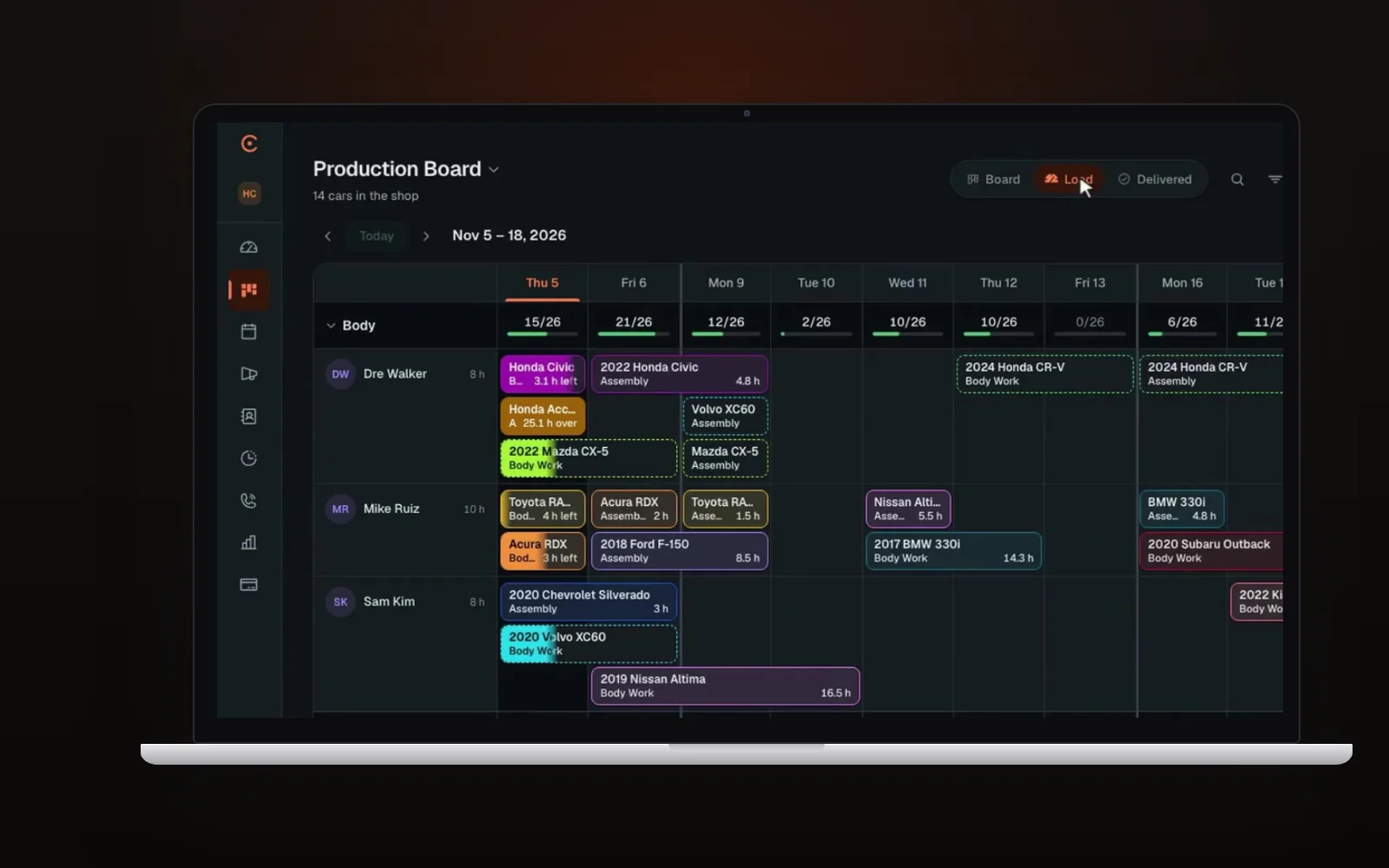
The Production Plan, on Elite. This is the floor schedule. You set the deadline: a promise to a customer, a rental return, a DRP program's days from your own agreement, or one car's own date. It's for any shop that sets its own dates and wants to meet them, and it handles DRP targets too. Carvikon plans each stage. Hours come from the estimate where it has them, and otherwise from how long that stage usually takes at your shop. Each stage goes to the tech who fits the department and can finish soonest, unless you name someone.
From there:
- Load lays out the next two weeks by department, so you can see who's full before you promise anything.
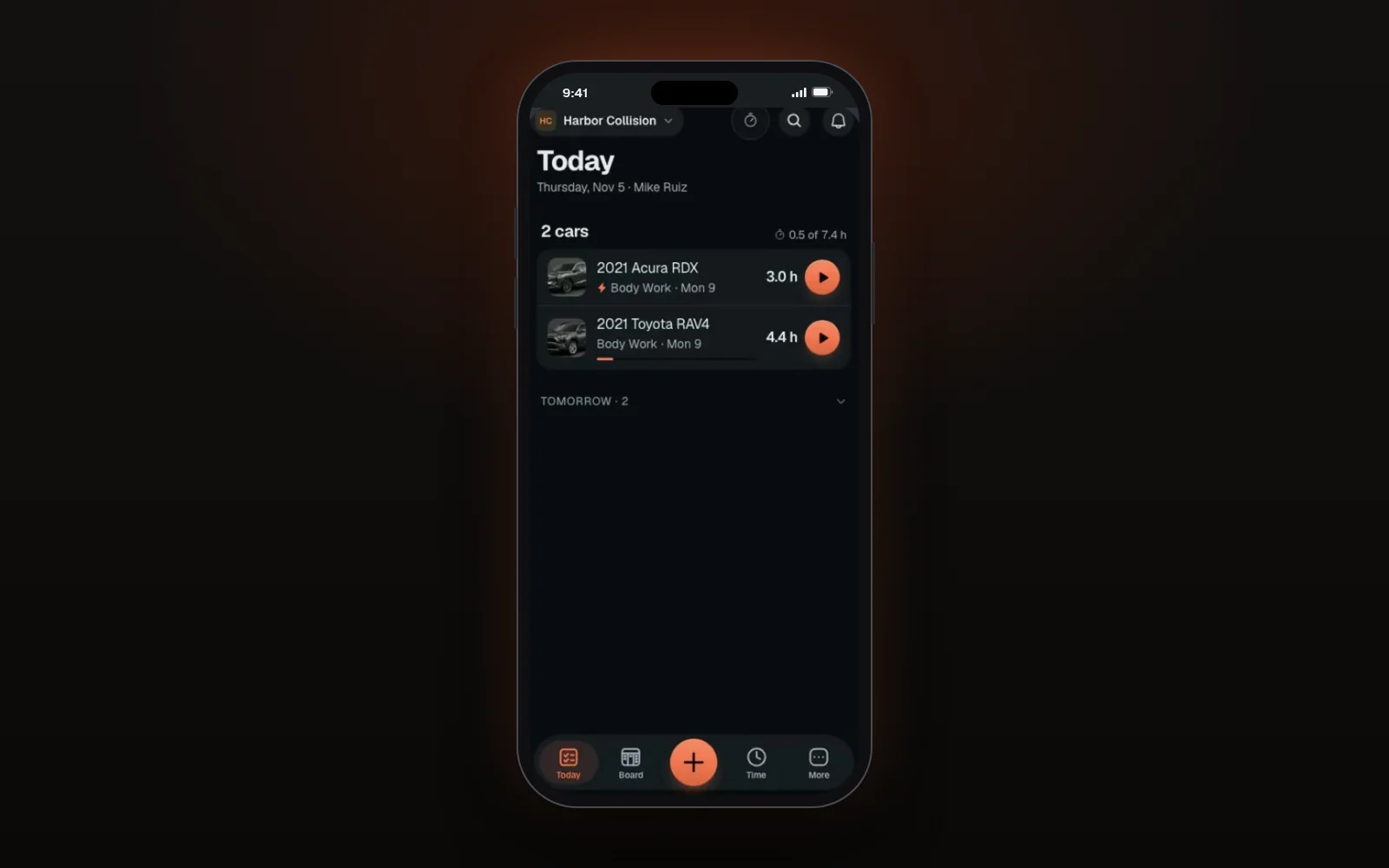
- Each technician gets a daily list on their phone: which cars, in what order, how many hours each. Fast-lane cars come first, then the nearest deadline.
- Each tech has their own hours for each weekday, and any date can be an exception, like an early finish or an extra Saturday. The plan only books people for the hours they're in.
- A car's clock starts when it arrives, not when someone adds it to the board.
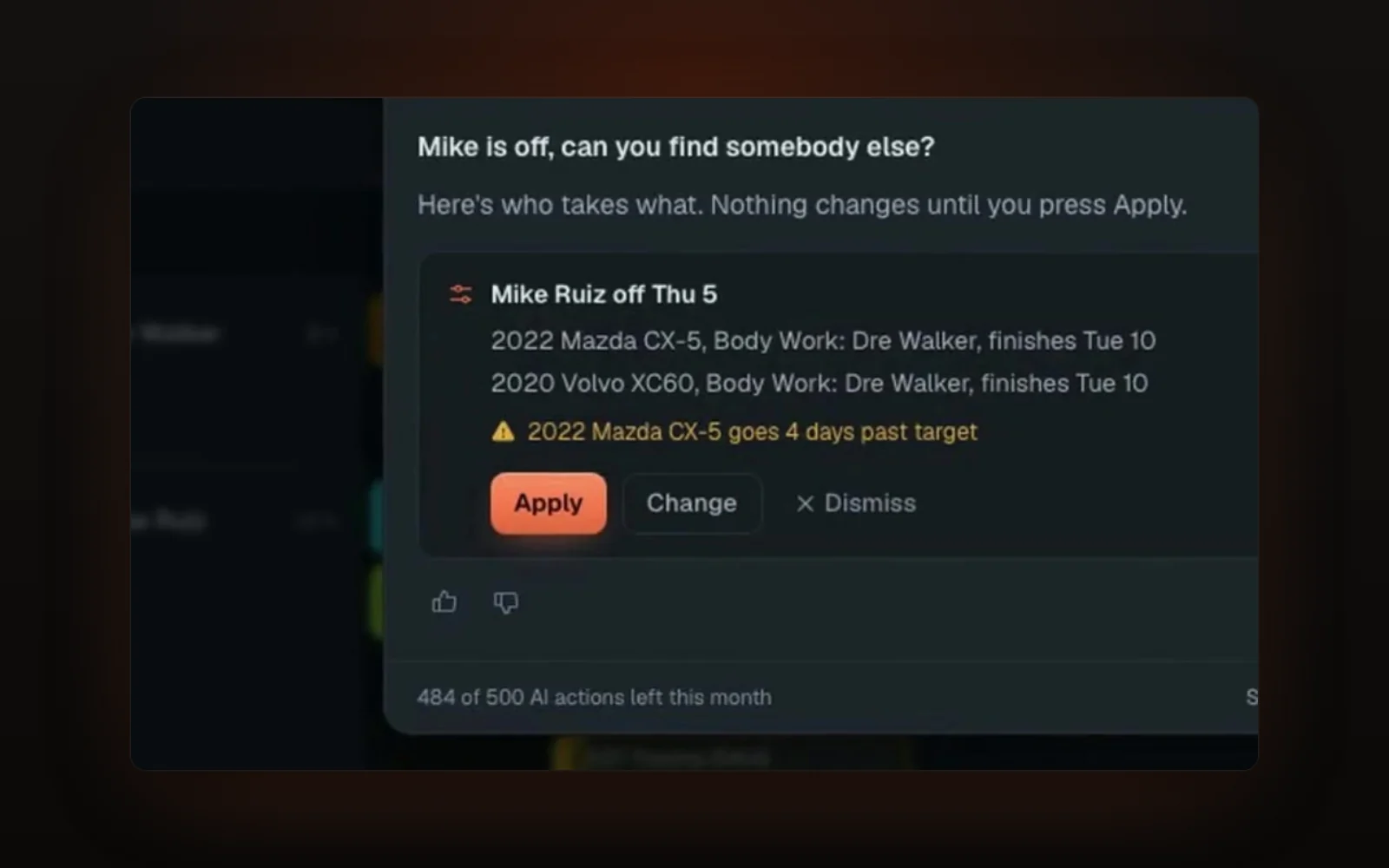
- When someone calls out, mark them off for the day or the week, or tell Ask Carvikon "Mike is off, can you find somebody else?" Each car moves to whoever fits and can finish soonest, and you see the result before you confirm. Undo puts everything back. You can also ask "who's free Thursday?"
A straight answer for mechanical shops: the Production Plan is marketed as technician scheduling for body shops, and every example we have today is collision work. The booking page, the board, the late glow and the AI Front Desk work the same in any shop. If you run a mechanical shop and want the Production Plan, ask us in the demo how it fits your flow before you buy Elite for it.
Collision shops keep CCC or Mitchell for insurer estimates and run Carvikon alongside them.
What to look for when you compare tools
Whatever you look at, put these questions to it:
- Can customers only book times that are actually free?
- Where does a new booking land? On a list, or on the board your crew works from?
- Can it see technician capacity, or only appointment slots?
- When a car falls behind, does anything warn you before the due date?
- Do techs get their own list, or do they still ask what's next?
- Does it sync with the calendar you already use?
- What happens to the calls you miss?
If a tool only answers the first question, it's a booking widget. That might be all you need, but be clear about which problem you're solving. Our body shop software checklist covers the rest of what to test.
FAQ
What is auto repair scheduling software?
Software that handles when cars arrive and, in better tools, when the work gets done. The basic version is an appointment calendar with online booking. The fuller version also plans stages, hours and technicians against the date you promised.
Do I need online booking?
If customers call to book and you miss calls, yes. A booking page that only offers open times takes those calls off the counter without letting anyone book a slot you can't take.
Is the Production Plan only for DRP shops?
No. It's for any shop that sets its own deadlines, whether that's a customer promise or a rental return. DRP shops can point it at their program targets too, using the days from their own agreement.
Does Carvikon sync with Google Calendar?
Yes. On every plan, a new appointment syncs to Google Calendar if you've connected one.
Can the AI receptionist book appointments?
Yes, on Elite. If you switch booking on, the AI Front Desk offers open times and books the appointment during the call. Booking is off until you turn it on.
Is there a contract?
No. Your first payment comes with a 30-day money-back guarantee, and there's no contract.
See your shop on one screen
If your calendar is full but your dates still slip, see both schedules on your own kind of shop.
Rather see it first? Book a live demo